Summarize with ChatGPTClaudePerplexity
TL;DR
- Free browser inspection can reveal some ChatGPT fan-out query metadata, but it is conditional and not a complete documented query log.[1]
- Promptwatch states that its ChatGPT GEO Inspector is free without an account or usage limit, while Writesonic’s detailed free fan-out quota is not published.[6]
- Qforia and similar tools generate probabilistic query hypotheses, so their output should be labeled simulated rather than treated as evidence of a real Google AI Mode search.[13]
- Gemini grounding can return `webSearchQueries`, with Gemini 3 and newer pricing documentation listing 5,000 free monthly search requests and $14 per 1,000 thereafter.[15]
- OpenAI’s web-search tool costs $10 per 1,000 calls, but returned search queries are not guaranteed for every search action.[21][1]
Yes—sometimes. Free browser inspection can reveal query strings that ChatGPT exposes, free extensions can capture selected ChatGPT or other assistant activity, and developer APIs can return structured grounding data. None of these methods guarantees a complete record of every search an AI system performed, so treat missing queries as “not exposed,” not as proof that no search occurred.[1]
Image
What are fan-out queries?
A fan-out query is a set of narrower searches an AI system generates from one user prompt before composing an answer. OpenAI says ChatGPT Search may rewrite a question into one or more targeted queries, meaning the user’s wording is not necessarily the literal search string sent to a provider.[2]
Fan-out inspection matters because it can reveal the subtopics, entities and sources that shape an answer. It also helps distinguish three different things:
- Observed queries: strings returned by a browser response or developer API.
- Simulated queries: plausible expansions generated by another model.
- Unexposed activity: searches that may have occurred but are not returned to the observer.
That distinction is essential. A source list or citation panel can show what an answer used without proving that it exposes the full query history.[3][4]
Which free method should you use?
The best starting point depends on whether you need one investigation, a simulated content plan or repeatable monitoring.
| Method | Engines | Shows observed or simulated queries | Cost | Limits |
|---|---|---|---|---|
| ChatGPT Sources and DevTools | ChatGPT Search | Observed metadata when exposed | Free | Fields may be absent or incomplete; browser inspection is not a supported export.[1] |
| Promptwatch GEO Inspector | ChatGPT | Vendor-described observed subqueries and sources | Free; no account or usage limit stated | ChatGPT-focused; completeness is not independently established.[5][6] |
| Writesonic extension | ChatGPT, Perplexity, Gemini and Claude | Vendor-described query tracking | Free to use; detailed free quota not published | Full feature limits and data handling require checking the current listing.[7] |
| Backlinko Query Fan-Out Tool | ChatGPT | Captured subqueries, model metadata and referenced URLs | Free | Cross-engine monitoring and completeness are not established.[8][9] |
| Feedough Query Fan-out Tracker | ChatGPT and Claude | Vendor-described actual queries and sources | Five prompts without an account; 10 prompts per day with a free account | Limited to supported web-search prompts.[10] |
| Open Queries | ChatGPT, Claude and Google AI Overviews | Observed queries plus separately requested estimates | Free and open source | Observed data may be transmitted; estimates are not observations.[11][12] |
| Qforia | Google AI Overviews and AI Mode-style planning | Simulated queries | Interface described as free; walkthrough requires a paid Gemini key | Probabilistic simulation, not a recorded Google session.[13] |
| Gemini grounding API | Gemini | Observed API-run search queries | Model- and tier-dependent | Shows the API request’s searches, not consumer Google AI Mode activity.[14][15] |
| OpenAI Responses API | OpenAI web search | Observed API actions and queries when returned | $10 per 1,000 web-search calls, plus applicable model/search-content charges | Search queries are usually, but not always, returned.[16] |
| Spreadsheet | Any manually inspected route | Whatever you record | Free | Manual, inconsistent and difficult to scale. |
Checked against public documentation and product pages on 15 November 2026.
How can you inspect ChatGPT with DevTools?
ChatGPT Search is available through the Search option in ChatGPT, and answers may include citations and a Sources interface. OpenAI documents those sources as references and relevant links, not as a complete query log.[16][1]
A browser investigation can sometimes find query metadata in the conversation response. AISO documents fields such as search_model_queries and search_queries, but also warns that missing fields do not prove that no search occurred.[1]
Step-by-step: inspect a ChatGPT browser response
- Open ChatGPT in a desktop browser and start a new conversation.
- Choose Search from the tools menu, then submit a prompt that requires current web information.[2]
- Wait for the answer to finish, open the browser’s developer tools and select the Network panel.
- Enable Preserve log, then reload the conversation containing the answer.[1]
- Filter requests to Fetch/XHR and search for the conversation identifier or a request associated with the conversation response.[1]
- Open the response body and search for
search_model_queriesorsearch_queries.[1] - If present, record the query strings under
metadata.search_model_queries.queriesor theqvalues insearch_queriesobjects.[1] - Save the prompt, date, conversation identifier, field name and visible sources alongside the query strings.
- If no field appears, record “Not exposed in this capture” rather than “No search occurred.”[1]
This method is useful for occasional investigations, but the fields are internal response data rather than a documented OpenAI export. Browser responses may omit server-side activity, so the result should be labeled as a partial observation.[1][7]
Which browser extensions can capture fan-out queries?
Several browser extensions advertise free or limited-free query inspection.
Promptwatch GEO Inspector says it is completely free, requires no account and has no usage limit. Its feature description says it can show ChatGPT subqueries, fetched pages and cited sources, while its Chrome listing identifies an August 2026 release.[6]
Writesonic describes its extension as free to use and advertises query tracking across ChatGPT, Perplexity, Gemini and Claude. The cited listing does not publish a specific free fan-out quota, so “free” should not be interpreted as unlimited.[13][16]
Backlinko’s ChatGPT Query Fan-Out Tool is described as free and advertises subqueries, model metadata, referenced URLs and CSV export. Its listing describes ChatGPT capture rather than cross-engine monitoring.[12]
Feedough’s tracker allows five prompts without an account and 10 prompts per day with a free account. It says it captures actual queries and sources while ChatGPT or Claude answers, and states that answer/search-answer data are not stored.[10]
Open Queries supports ChatGPT, Claude and Google AI Overviews. It separates observed search activity from separately requested likely-fan-out estimates, which is useful for preserving provenance.[12]
Data handling differs materially. Promptwatch says its extension operates locally without its own network requests, while Backlinko says conversations remain in the browser; Open Queries discloses that observed queries are transmitted after privacy acceptance with a pseudonymous installation tag.[12]
What are the terms-of-service and privacy risks of extensions?
Terms-of-service and privacy checklist
OpenAI’s consumer terms prohibit automatically or programmatically extracting data or output, reverse engineering underlying components and circumventing rate limits or protective measures.[17] The terms do not provide clearance for any named extension, so installation through a browser store should not be treated as permission.
Chrome policies treat scraped website content, browsing activity and HTTP request or response content as user data. Extensions must use the narrowest necessary permissions, clearly disclose their purpose in the product and follow applicable data-use and privacy requirements.[7]
Before installing an extension, check:
- Whether it reads only the assistant pages you intend to inspect.
- Whether query text leaves the browser.
- Whether prompts, conversation titles or account identifiers are retained.
- Whether the extension has a clear privacy policy and in-product disclosure.
- Whether organizational or client data may appear in inspected conversations.
- Whether the workflow is allowed under the relevant platform terms.
“Free” and “local” describe cost or data handling; neither independently establishes authorization to automate extraction.[6]
What can simulators show?
Simulators generate plausible query expansions rather than recording the searches used in a particular production answer. Qforia describes itself as a query-fan-out simulator for AI Overviews and AI Mode-style workflows, and its walkthrough describes probabilistic output intended for planning rather than precise reproduction.[13]
Qforia’s documented workflow runs repeated synthetic model passes and aggregates normalized matches. Its walkthrough requires a paid Gemini API key, so a freely accessible simulator interface does not necessarily mean zero provider cost.[7][13]
Other simulators make similar claims:
- Otterly Query Fan Out generates variations that Google and ChatGPT might use; its language describes likely queries rather than captured searches.[4]
- Promptwatch’s generator creates query clusters from a model trained on a large query corpus and imposes a 500-character input limit; it does not document executing the target session’s live searches.[18]
- Qforia is best treated as a hypothesis generator for content planning, not proof of what Google AI Mode searched.[13]
Research on automatic query expansion also cautions against assuming that more expansion is always better. A study covering 11 expansion techniques, 12 datasets and 24 retrieval models found that expansion helped weaker retrieval models but generally harmed stronger ones, supporting conditional validation rather than automatic expansion.[18]
Keep simulator output in a separate dataset from captured queries. Label every row as simulated, observed or not exposed.
How can Gemini expose grounding searches?
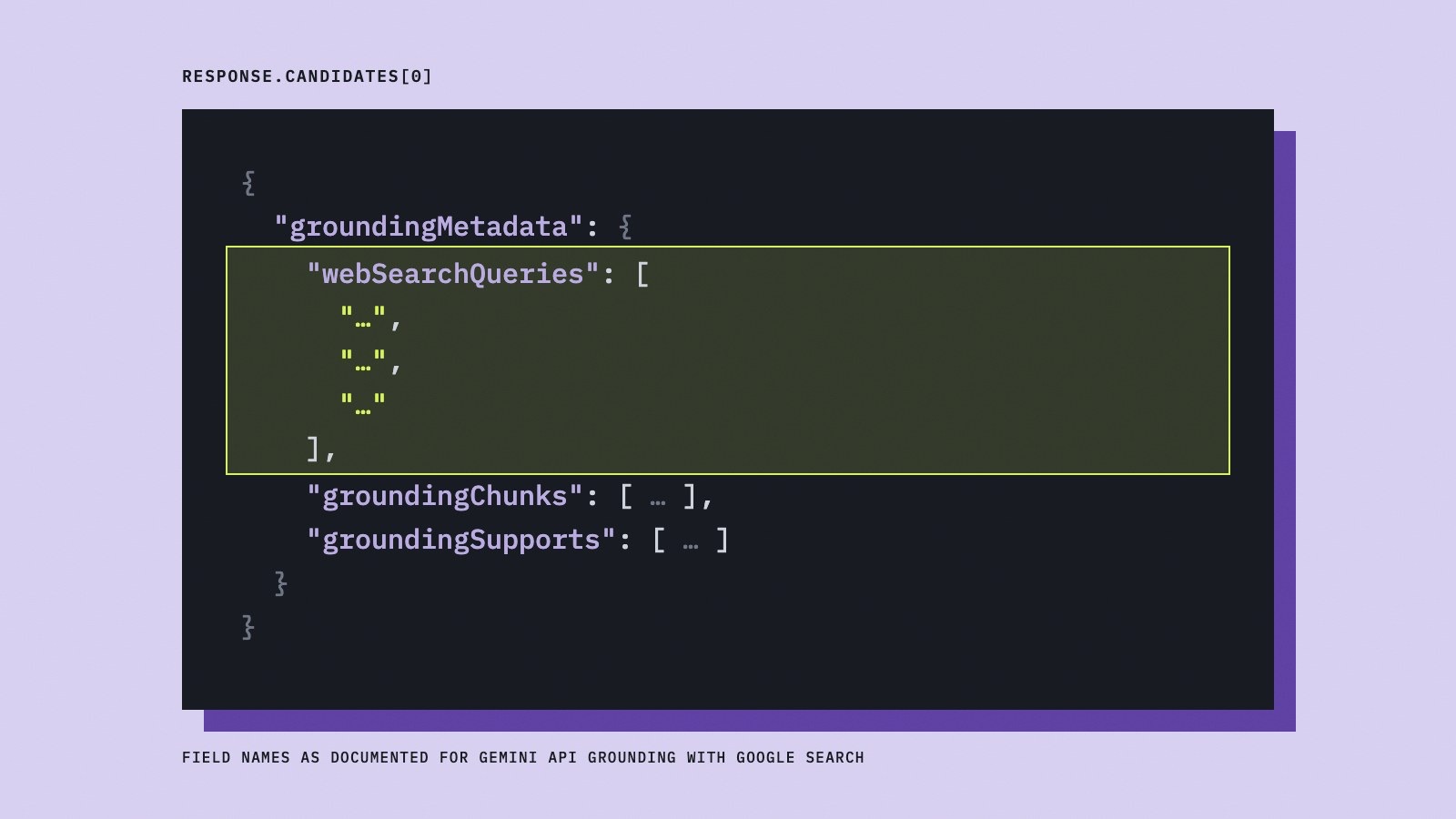
Gemini’s GenerateContent API can use Google Search grounding. Google documents a groundingMetadata object containing webSearchQueries, groundingChunks, groundingSupports and searchEntryPoint.[19]
The fields answer different questions:
| Field | What it shows |
|---|---|
webSearchQueries |
Search queries used by the grounded API response.[19] |
groundingChunks |
Web-source titles and URLs.[20][12] |
groundingSupports |
Connections between answer text and grounding sources.[19] |
searchEntryPoint |
Markup for required Google search suggestions.[19] |
Step-by-step: log Gemini grounding metadata
- Create or select a Gemini API project and confirm the applicable model, tier and rate limits.[21][15]
- Enable Google Search grounding with the documented tool configuration.
- Send a prompt that may benefit from current information.
- Save the model name, request ID, timestamp and prompt.
- Read
response.candidates.groundingMetadatain JavaScript, or the equivalentgrounding_metadataproperty in Python.[22][19] - Store
webSearchQueriesas one row per query. - Store
groundingChunksseparately from the query rows. - Preserve
groundingSupportsso source-to-answer relationships remain traceable. - Record the actual provider usage and any search suggestions your application displays.
Gemini 3 and newer grounding includes 5,000 free search requests per month in the cited pricing documentation, then costs $14 per 1,000 search requests; billing is based on the individual search queries the model executes.[15][23] The API has a default paid-tier limit of 1,500 grounding requests per day per project for Gemini 3 and newer models.[15][23]
The economics and response schema are model-specific. Google’s Interactions API uses structures such as google_search_call and google_search_result, so a logger built only for groundingMetadata may need another parser.[1]
This route shows searches executed for your developer request. It does not reveal what a separate Gemini consumer session, Google AI Overview or Google AI Mode session searched.
Can OpenAI’s API expose web-search queries?
OpenAI’s Responses API supports a hosted web_search tool. The documented integration can request consulted sources with web_search_call.action.sources.[16]
Step-by-step: inspect an OpenAI web-search response
- Create an OpenAI API request using the Responses API.
- Enable the
web_searchtool. - Request
web_search_call.action.sourcesin the response. - Submit a prompt that requires current information.
- Inspect
web_search_calloutput items and distinguishsearch,open_pageandfind_in_pageactions.[16] - Save any returned
queriesseparately from source URLs. - Save inline citation annotations separately from the broader consulted-source list.
- Mark a run as query not returned if the response contains search activity but no query string.
OpenAI says a search action usually, but not always, includes the searched queries. Therefore, citations and source URLs do not justify reconstructing missing queries and calling them observed.[1]
The current web-search tool price is $10 per 1,000 calls, with search-content tokens billed at model rates in the cited pricing documentation.[15] The tool-call price is separate from the model cost, so a low-cost experiment still needs a budget for both.
This is a controlled developer experiment, not a transcript of what consumer ChatGPT searched. Applications displaying web-derived information must also provide prominent, clickable citations.[16]
How should you log fan-out queries manually?
A spreadsheet is sufficient for occasional research if it preserves provenance. AISO recommends associating captured queries with the message, user turn, capture date and visible model, while labeling unclear associations at conversation level.[1]
Use one row per query and keep a separate run record with these columns:
| Column | Example value | Why it matters |
|---|---|---|
| Run ID and timestamp | chatgpt-2026-11-15-001 |
Separates repeat observations |
| Prompt and context | Exact prompt and relevant settings | Makes runs comparable |
| Engine and model | ChatGPT Search or Gemini model | Prevents cross-engine mixing |
| Method | DevTools, extension, API or simulator | Preserves provenance |
| Query text | One exact string per row | Allows deduplication |
| Evidence field | webSearchQueries or response field |
Makes the observation traceable |
| Sources | Consulted URLs and cited URLs in separate columns | Separates source trails from citations |
| Status | Observed, simulated or not exposed | Avoids false negatives |
| Cost | API/tool usage | Enables realistic comparisons |
Avoid turning a missing field into a zero. A run with no exposed query should remain in the dataset because it documents an observation boundary.
When is a paid tracker worth it?
A paid tracker becomes useful when the work involves many prompts, several engines, recurring runs, historical comparisons or collaboration. Commercial products can organize tracked prompts and fan-out results across time, but payment does not guarantee complete visibility into upstream search activity.[4]
Peec documents fan-out views for ChatGPT, Perplexity and Copilot, while Rankscale describes searches behind tracked prompts and domains that were probed but not cited.[24] Ahrefs cautions that returned fan-outs may be fewer than the searches actually used; simple prompts may produce one or none.[25]
Choose a paid tool for:
- Repeatable scheduled collection.
- Historical comparison across prompts and engines.
- Centralized source and competitor analysis.
- Reduced spreadsheet and reconciliation work.
- Team access, exports or reporting workflows.
- A larger operational scope than occasional manual inspection.
There is no universal prompt-count or dollar threshold at which a paid tracker becomes worthwhile. Start free when the research is exploratory; pay when repeatability and labor savings matter more than the subscription cost.
Finseo is one example of a broader AI-visibility platform rather than a free fan-out inspector; it tracks prompts daily across selected AI engines, along with cited sources and competitors, and adds AI traffic analytics, attribution and prioritized tasks. For teams, its enterprise page lists SSO via SAML, roles per project, an audit trail and unlimited seats, plus hosting in Frankfurt, Germany with EU data residency, GDPR compliance with a data processing agreement (DPA) and ISO 27001 certification. Its query fan-out analysis records the sub-queries engines run while answering tracked prompts, ranks them by frequency, shows new and rising fan-outs and exports them via CSV, the API and MCP. Fan-outs are collected only where the engine exposes its searches.
The purchasing criterion should be repeatability, not a promise of omniscience. Even commercial interfaces can expose only the fan-outs returned by an upstream system.[26]
Frequently asked questions
Can I see ChatGPT fan-out queries for free?
Sometimes. ChatGPT may expose query metadata in browser responses, and tools such as DevTools or selected extensions can help inspect it.[1] The metadata is conditional and may not include every server-side search, so absent fields should be recorded as “not exposed.”[1]
What is the easiest way to check ChatGPT fan-out queries?
For a one-off investigation, run a ChatGPT Search prompt, inspect the conversation response in DevTools and search for `search_model_queries` or `search_queries`.[1] A free extension may be easier, but review its permissions, data handling and compatibility with the platform’s terms before using it.[7]
Is Qforia showing real Google AI Mode fan-out queries?
No. Qforia generates probabilistic synthetic query expansions for planning; it does not document recording a particular Google AI Mode session.[13] Use its output as a content hypothesis and label it simulated.
Can Gemini’s API show the searches used for grounding?
Yes. Google documents `groundingMetadata.webSearchQueries` for GenerateContent requests using Google Search grounding.[15][22] That metadata describes the searches executed for the API request, not an unrelated consumer Gemini, Google AI Overview or Google AI Mode session.
Does OpenAI’s web-search API always return the fan-out queries?
No. OpenAI says a search action usually, but not always, includes its `queries` field.[16] The response can still provide search actions, citations and consulted sources, but missing query strings should not be reconstructed as observed data.
Sources
- 1How to find ChatGPT's fan-out queries — getaiso.com
- 2Searching the web with ChatGPT | OpenAI Help Center — help.openai.com
- 3Query Fanout - Chrome Web Store — chromewebstore.google.com
- 4Free Query Fan-Out Tool & Generator: See AI Sub-Queries (ChatGPT, AI Mode, AI Overviews) | OtterlyAI — otterly.ai
- 5Promptwatch: GEO Inspector for AI Answers - Chrome Web Store — chromewebstore.google.com
- 6Chrome Extension | GEO Inspector for ChatGPT | Promptwatch — promptwatch.com
- 71. How do I determine if my Product is compliant with the User Data Policy or if I need to make any changes? — developer.chrome.com
- 8ChatGPT Query Fan-Out Tool - Chrome Web Store — chromewebstore.google.com
- 9Query Fan-Out: What It Is and How It Affects AI Visibility — backlinko.com
- 10Query Fan-out Tracker: AI Search Queries, Sources & Citations - Chrome Web Store — chromewebstore.google.com
- 11AI Search Extension for ChatGPT, Claude & Google AI · Open Queries — openqueries.org
- 12Privacy Policy · Open Queries — openqueries.org
- 13Query Fan-Out in Practice: Turning One Search into an Omnimedia Content Plan — ipullrank.com
- 14Chrome extension · queryfanout.com — queryfanout.com
- 15Gemini Developer API pricing | Gemini API | Google AI for Developers — ai.google.dev
- 16Web search — developers.openai.com
- 17Terms of Use | OpenAI — openai.com
- 18When do Generative Query and Document Expansions Fail? A Comprehensive Study Across Methods, Retrievers, and Datasets — aclanthology.org
- 19Grounding with Google Search - generateContent API | Google AI for Developers — ai.google.dev
- 20Methodology · Open Queries — openqueries.org
- 21Rate limits - Gemini API | Google AI Studio — aistudio.google.com
- 22Generating content — aistudio.google.com
- 23Grounding with Google Search - Gemini API | Google AI Studio — aistudio.google.com
- 24Query Fanout: See the Searches Behind AI Answers | Rankscale — rankscale.ai
- 25How to view fanout queries generated by AI | Help Center - Ahrefs — help.ahrefs.com
- 26Query Fan-Out, Latent Intent, and Source Aggregation — ipullrank.com