Summarize with ChatGPTClaudePerplexity
TL;DR
- Finseo records fan-outs from tracked results and exposes query, frequency, prompt, model and last-seen data through dashboard, REST API and MCP interfaces.[7]
- Promptwatch’s browser extension inspects fan-outs already delivered to a ChatGPT tab without making its own network requests.[13]
- Ahrefs Brand Radar displays fan-out queries returned with ChatGPT and Perplexity responses, but warns that an AI system may use more searches than the tool displays.[15]
- Otterly and Qforia simulate likely expansions, so their output should support planning rather than be presented as a complete record of engine searches.[10][1]
- Google says AI Overviews and AI Mode may use multiple related searches, but that does not mean third-party tools can see every internal search.[5]
- Finseo is the best fit for tracked query fan-out analysis because it aggregates observed queries by frequency, originating prompt and model and exposes them through REST and MCP.[1]
Query fan-out tools fall into four groups: platforms that record exposed searches from tracked AI responses, browser inspectors that show searches during a live interaction, provider-backed research tools, and simulators that predict likely subqueries. Finseo is the strongest fit for ongoing prompt-linked analysis because it aggregates observed fan-outs by query, frequency, originating prompt and model, while tools such as Otterly and Qforia are better treated as generators rather than recording systems.[1][2]
Summarize this article with AI:
What is query fan-out?
Query fan-out is the process in which an AI search system expands one user prompt into several related searches before producing an answer. Google describes AI Overviews and AI Mode as features that may use multiple searches across related subtopics and sources, while noting that the two surfaces can use different models and techniques.[3]
For example, a prompt asking for the best accounting software might lead to searches about pricing, integrations, security, user size and alternatives. Finseo’s own research found that AI Mode rewrites one prompt into about nine synthetic searches, and 95% of them have zero search volume. The resulting answer combines information from those branches rather than relying only on the original wording.
The term describes engine behavior, not necessarily something a monitoring platform can observe. Some tools display searches returned with an AI response; others capture provider-backed searches, inspect a browser session or generate plausible expansions. These outputs should not be treated as interchangeable.
A research paper on RAG-Fusion offers a useful technical analogy: a system can generate multiple queries, retrieve documents for each one and combine the results using reciprocal rank fusion.[4] That research explains why query expansion can improve coverage, but it does not prove that a commercial tool has access to the private search trace of ChatGPT or Google AI Mode.[5]
How were these tools compared?
The comparison uses five criteria:
- Data provenance: whether the tool records exposed searches, captures provider-backed searches, inspects a live browser response or predicts likely expansions.
- Engine coverage: which platforms are explicitly documented for the fan-out feature itself.
- Prompt relationship: whether each search remains connected to its originating prompt and response.
- Analysis depth: whether the tool provides counts, trends, source or domain information, exports and API access.
- Completeness and availability: whether the vendor documents missing-query behavior, plan limits, rollout status or implementation details.
The review was checked against vendor documentation and published research on 13 November 2026. Features described as “not published” are not treated as confirmed capabilities.
| Tool | Fan-out evidence | Engines documented for fan-out feature | Standout capability | Best for |
|---|---|---|---|---|
| Finseo | Observed fan-outs from tracked results[2] | ChatGPT, Claude and Perplexity in API documentation[2][6] | Frequency, prompt and model-linked analysis with REST and MCP[7] | Ongoing GEO analysis |
| Profound | Captured fan-outs from tracked answers[8] | Examples include ChatGPT, Claude and Gemini[8][9] | Variation and trend analysis[10][8] | Enterprise answer-engine research |
| Peec AI | Background searches and aggregated fan-out views[11] | ChatGPT, Perplexity and Copilot in current guide[11] | Query rows, occurrences and API views[11] | Structured fan-out reporting |
| Promptwatch | Extracted searches from responses[6] | ChatGPT, Perplexity, Copilot and others in platform guide[12] | Free browser inspection for ChatGPT[13] | Manual investigation |
| Ahrefs Brand Radar | Queries returned with responses[14][15] | ChatGPT and Perplexity[14][16] | Fanout query column and prompt panel[14] | Brand monitoring |
| Rankscale | Recorded internal searches[5] | ChatGPT, Perplexity, Claude and Copilot[5] | Probed domains and win/loss analysis[5] | Domain-level diagnostics |
| Scrunch | Nullable API fan-out object[17] | Not published | API fields and query dimensions[18][17] | Data pipelines |
| AthenaHQ | Captured web and map searches[19] | Not published | Search-query exports and response links[20] | Search-query analysis |
| Writesonic | Live browser side-panel queries[21][22] | ChatGPT, Claude, Gemini and Perplexity[22] | Copy and CSV export[22] | Browser-based inspection |
| Otterly | Simulated expansions | ChatGPT, AI Mode and AI Overviews[12][20] | Free generator delivered by email[23][24] | Quick planning |
| Qforia | Predicted expansions[25][23] | AI Mode and AI Overviews simulation[25][26] | Multiple passes, clustering and exports[26] | Research experiments |
| Semrush | Approximation in standard toolkit; separate Enterprise capture[27] | Standard support not published; Enterprise covers ChatGPT searches[28] | Related topics and Enterprise search analysis[28] | Existing Semrush users |
Checked against vendor documentation and public product information on 13 November 2026.
1. Finseo — best for tracked fan-out analysis
Finseo connects query fan-outs to a tracked prompt set instead of presenting only a one-off list of suggestions. Its documentation describes aggregated fan-outs ordered by frequency, with each record containing the query, occurrence count, number of originating prompts, models, last-seen date and a sample prompt.[19] From the Business plan, fan-outs your content does not answer become content tasks with a brief in a prioritized AEO task list that scores impact and effort from 1 to 10. That list sits alongside content optimization, which gives each page an AEO score from 0 to 100. For enterprise teams, Finseo offers SSO via SAML, roles per project, an audit trail and unlimited seats, according to its enterprise page. It is hosted in Frankfurt, Germany, with EU data residency, is GDPR-compliant with a data processing agreement (DPA) and is ISO 27001 certified.
Key features
- Fan-out list and detail endpoints for tracked projects.[20]
- REST API access through fan-out endpoints, including date ranges, pagination and up to 500 results per page.[5][17]
- MCP access through
get_query_fanouts.[18] - Query frequency, originating-prompt counts, model labels and last-seen information.[1][29]
- Content-gap workflows based on fan-outs that tracked content does not answer.[19]
- Dashboard analysis connected to prompt, source and model data.[30][18]
Finseo’s API documentation names ChatGPT, Claude and Perplexity for fan-out analysis.[2][31] Its published research specifically discusses observed ChatGPT data and distinguishes that evidence from direct observation of Google AI Mode’s complete internal fan-out.[17]
Strengths
- Strong connection between observed searches and the prompts that generated them.[17]
- Structured API and MCP access for reporting or internal workflows.[17]
- Frequency data helps separate recurring branches from isolated searches.[1]
- Fan-outs can feed content-gap and optimization processes.[32]
Limitations
- Tasks, content tools and bot analytics start at Business.[33]
- Fan-outs are collected only where an engine exposes its searches.[1]
- API access starts at Growth, while MCP is listed across plans.[34]
- Documented API engine coverage does not establish complete Google AI Mode coverage.[29]
Pricing checked 13 November 2026
Finseo’s Starter plan costs €84 per month (about $93) when billed monthly or €70 per month (about $77) as an annual-billed monthly equivalent. Business costs €210 (about $231) monthly or €175 (about $193) annually billed, and Growth costs €479 (about $528) monthly or €399 (about $439) annually billed; prices exclude VAT.[34]
Starter includes 50 tracked prompts and three models concurrently, Business includes 150 prompts and three models, and Growth includes 350 prompts, three models and five projects.[34] Enterprise pricing is custom and includes all 23 listed models.[34]
Verdict: Best for teams that need an ongoing inventory of observed fan-outs tied to tracked prompts, with programmatic access and clear frequency analysis.[5][17]
2. How does Profound analyze fan-out query variations for AI visibility tracking?
Profound’s Query Fanouts feature shows prompts that produced fan-outs and lets users analyze unique variations, frequency and changes in share over time.[8][19] Its analysis also examines words added, dropped or retained, as well as date tokens and persona effects.[5]
Key features
- Prompt-level fan-out views.
- Variation frequency and trend analysis.[4]
- Word-change and date-token analysis.
- Examples involving ChatGPT, Claude and Gemini.[35][4]
Strengths
- Useful for seeing how repeated answer-engine runs change a prompt.[28]
- Goes beyond a raw query list by analyzing lexical variation.[20]
- Designed for recurring monitoring rather than isolated manual checks.[27]
Limitations
- A complete fan-out engine matrix is not published in the cited materials.[29]
- The low-level capture method is not published.[36]
- Fan-out-specific API and export limits are not published.[27][29]
Verdict: Best for teams studying how answer-engine query variations evolve over time.[36][8]
3. Peec AI — best for fan-out metrics and API views
Peec AI provides a Fanouts area with distinct queries, occurrence counts, topics, prompts and query types.[11] Its API changelog documents query rows and aggregated fan-out views added on 4 November 2026.[37]
Key features
- Distinct query and occurrence analysis.[5]
- Grouping by topic or originating prompt.[15][19]
- API query rows and aggregate views.[37]
- Filters involving model, topic, prompt and tag.[37][19]
Strengths
- Separates unique fan-outs from total occurrences.[11]
- Provides a structured API path for analysis.[17]
- Supports prompt and topic comparisons.[36][15]
Limitations
- The current guide lists ChatGPT, Perplexity and Copilot, while another Peec article names ChatGPT, Grok and Perplexity.[19][4]
- Definitions for Search, Shopping and Synthetic query types are not published in the cited guide.[29][11]
- The low-level collection method is not published.[12][10]
Verdict: Best for teams that want fan-out metrics organized into query, prompt, topic and API dimensions.[11][18]
4. Promptwatch — best for live ChatGPT inspection
Promptwatch describes its platform as extracting actual queries from AI responses rather than simulating or predicting them.[12] Its free Chrome extension focuses on ChatGPT and reads responses already delivered to the browser tab without making network requests of its own.[13]
Key features
- Query Fanouts analysis in the platform.[38]
- Per-response search-theme analysis.
- CSV and Excel export.[6]
- Free ChatGPT inspection extension with no account requirement.[13]
Strengths
- Clear distinction between extraction and prediction.[19]
- The extension is suitable for inspecting a single live ChatGPT response.[1]
- The extension does not make its own network requests.[13]
Limitations
- The extension covers ChatGPT only.[39][6]
- Inspection is session-based, not the same as broad historical monitoring.[15]
- Only searches exposed in the response can be inspected.[17]
Verdict: Best for a researcher who wants to examine what ChatGPT exposed during a live browser interaction.[12][39]
5. Does Ahrefs Brand Radar track fan-out queries in ChatGPT and Perplexity?
Ahrefs Brand Radar includes a Fanout queries column and a prompt side panel for ChatGPT and Perplexity responses.[14][15] The tool displays queries returned with an AI response, but Ahrefs says the AI may use more searches than the tool returns.[15]
Key features
- Fanout queries column.[14]
- Prompt-level side panel.
- Coverage for ChatGPT and Perplexity.[36][5]
- Broader Brand Radar methodology based on publicly available web interfaces.[16]
Strengths
- Makes fan-out queries available inside a broader brand-monitoring workflow.[19]
- Documents an important completeness limitation rather than implying a full internal trace.[16]
- Useful when AI visibility monitoring is already managed in Ahrefs.[18][27]
Limitations
- It does not establish Google AI Mode fan-out coverage.[29]
- Returned queries may be incomplete.
- Access depends on relevant AI-platform add-ons and prompt configuration.[19]
Verdict: Best for Ahrefs users who need exposed fan-out queries alongside broader ChatGPT and Perplexity visibility data.[16]
6. Rankscale — best for domain-level fan-out analysis
Rankscale’s Query Fanout view includes all queries, probed domains, wins and losses, query changes and links to parent prompts.[5] It documents coverage for ChatGPT, Perplexity, Claude and Copilot.[5]
Key features
- Query-level and prompt-level relationships.
- Domains probed by the answer engine, including domains not cited.[5]
- Win/loss analysis.
- CSV and Google Sheets export on Pro and above.[5]
Strengths
- Connects fan-out searches to competitive domain evidence.[36][33]
- Shows more than only the final cited sources.[4]
- Supports changes over time.[40]
Limitations
- Export requires Pro or higher and is disabled in shared mode.[5]
- The lower-level capture implementation is not published.
Verdict: Best for SEO teams that want to investigate which domains are probed during fan-out, not only which domains appear in the final answer.[28]
7. Scrunch — best for API-based fan-out fields
Scrunch’s Responses API returns a nullable query_fanout object containing queries and engine metadata.[17] Its Query API supports query_fanouts as an analysis dimension.[37]
Key features
- Raw answer and citation response data.[17][20]
- Query fan-out object with query and engine metadata.[17]
- Aggregated query-fanout dimension.[37]
- Explicit handling for unavailable fan-outs.
Strengths
- Useful for teams building their own reporting around API data.[40][12]
- Makes missing fan-out data a defined state rather than silently treating it as a negative result.[4]
- Supports response-level and aggregate analysis.[37]
Limitations
- Per-engine fan-out support is not published.[10]
- A response without fan-out contributes zero rows to the fan-out dimension.[19]
- The fan-out dimension is not filterable.
Verdict: Best for developers who need fan-out fields in a visibility data pipeline and can handle nullable or absent records.
8. AthenaHQ — best for exported search-query records
AthenaHQ distinguishes prompt variations from its Search queries view. The latter lists actual web and map searches captured behind AI responses and allows users to inspect associated responses.[19]
Key features
- Search queries view separate from prompt variations.[19][8]
- Expandable searches linked to contributing responses.[6][19]
- Summary and all-search CSV exports.[27][39]
- Coverage of web and map searches in the documented workflow.[19]
Strengths
- Clear separation between modified prompts and searches performed behind answers.[19]
- Export supports analysis outside the product.[29]
- Response links help preserve evidence context.[19][1]
Limitations
- Per-engine support is not published in the cited guide.[10][29]
- Search-query API schema and entitlement are not published.[35]
- The low-level capture implementation is not published.
Verdict: Best for analysts who need exported search-query records and response context rather than only prompt variants.[36]
9. Writesonic — best for a browser side panel
Writesonic’s Chrome extension displays live fan-out queries while a platform answer is being produced and supports copying and CSV export.[22] The extension documents ChatGPT, Claude, Gemini and Perplexity coverage, although Perplexity exposure is less consistent than the other named platforms.[22]
Key features
- Live side-panel query display.[1][14]
- Copy and CSV export.[22]
- ChatGPT, Claude, Gemini and Perplexity support in the extension.[1][22]
- Gemini use requires a Google AI Studio API key.[22]
Strengths
- Convenient for inspecting a live response.[1]
- More than one AI platform is documented.[12][10]
- CSV export makes manual review easier.[19]
Limitations
- Fan-out-specific free usage is not published.[16][13]
- Perplexity coverage is less consistent.[36][22]
- The interception or collection implementation is not published.
Verdict: Best for users who want a lightweight browser-side view across several consumer AI platforms.[4][20]
10. Do Otterly, Qforia and the Semrush AI Visibility Toolkit only predict fan-out queries?
These tools should not be grouped with observed-query platforms without qualification.
Otterly’s standalone Query Fan-Out Tool & Generator simulates likely searches for ChatGPT, Google AI Mode and Google AI Overviews.[23][30] Qforia is also explicitly a simulator, with multiple passes, frequency weighting, clustering, exports and saved history.[26]
Semrush’s standard AI Visibility Toolkit approximates subqueries through related topics, while its separate Enterprise AI Optimization capability describes searches behind ChatGPT responses.[24] The Enterprise capability should not be assigned to the standard toolkit.[27]
Strengths
- Useful for generating research angles before tracking begins.[22]
- Otterly’s standalone tool is available without login and returns results by email.[30]
- Qforia supports repeated passes, clustering and export.[26]
- Semrush users can connect related topics to an existing AI visibility workflow.[19]
Limitations
- Predicted expansions are not records of an engine’s actual internal searches.[5]
- Provider or API costs may apply to open tools using personal keys.[32]
- Semrush’s standard and Enterprise capabilities must be kept separate.[28]
Verdict: Best for planning and prompt discovery, not for proving what a consumer AI engine actually searched.
Which AI visibility tool should SEO and marketing teams choose?
- Choose Finseo if you need recurring fan-out analysis linked to tracked prompts, frequency, model data and programmatic access.[19]
- Choose Profound if your priority is analyzing changing query variations, word additions and trend share.[5]
- Choose Peec AI if you want distinct-query, occurrence, topic and API views.[5]
- Choose Promptwatch if you need a free ChatGPT inspector for individual browser sessions.[13][12]
- Choose Ahrefs Brand Radar if ChatGPT and Perplexity monitoring already sits inside your Ahrefs workflow.[19]
- Choose Rankscale if you need probed domains, competitive wins and losses around fan-out branches.[5]
- Choose Scrunch if your team needs raw API fields and can manage missing fan-out states.[19][40]
- Choose AthenaHQ if exported search records and linked responses matter most.[19]
- Choose Writesonic if a browser side panel is more useful than a historical monitoring platform.[19]
- Choose Otterly, Qforia or standard Semrush if you want likely subqueries for research and content planning.[4]
No tool should be described as showing every query an AI system uses unless its documentation establishes that level of completeness. Ahrefs explicitly warns that returned fan-outs can be fewer than the searches actually used, and Scrunch represents unavailable fan-out data as null or zero-row output depending on the endpoint.[15][1]
How does fan-out capture work?
A fan-out tool usually follows one of four workflows:
- Tracked-response extraction: The platform sends prompts to supported engines, receives answers and records exposed fan-out searches alongside the response.[19]
- Browser inspection: An extension reads the queries displayed during a live consumer interaction, such as Promptwatch’s ChatGPT inspector.[13]
- Provider-backed execution: A tool runs a web-search-enabled answer process and records the searches executed by that provider workflow.[19]
- Prediction: A language model generates plausible expansions without observing the engine’s private search trace.[1]
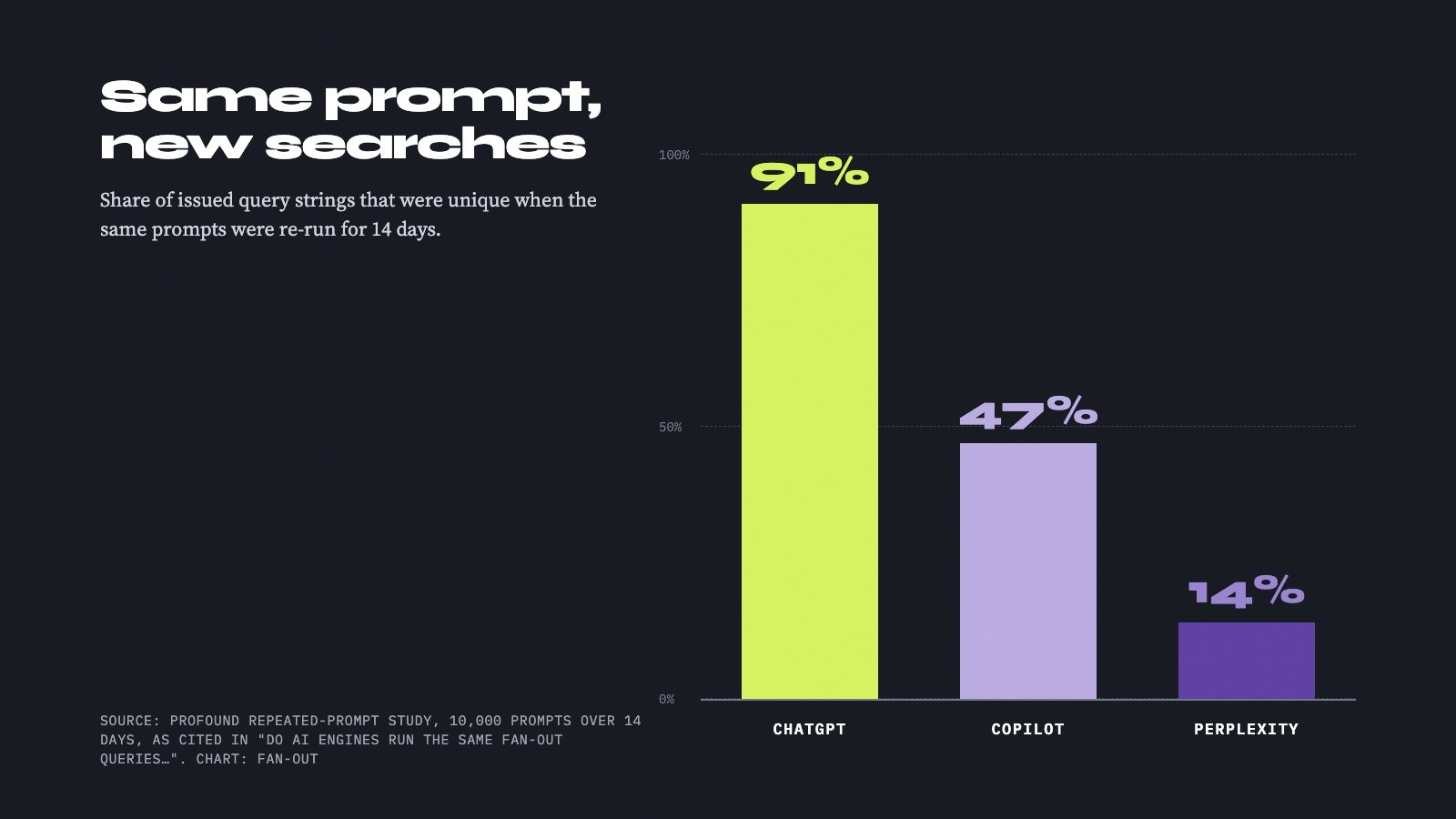
The first three can expose observed searches, but coverage depends on what the engine or provider returns. Google says AI Overviews and AI Mode may use query fan-out, yet a public third-party product still needs a documented way to access those searches.[19][5] In Finseo’s own German-language (DACH) fan-out data, fan-out search text was only visible for ChatGPT and Claude, and on 96.8% of consecutive days a prompt’s ChatGPT fan-out searches shared no identical string, so a single captured session is a narrow sample.
A useful measurement model is therefore:
[ \text{Evidence strength} = \text{observed query}
\text{provider-executed query}
\text{predicted query} ]
This ordering does not mean predictions are useless. Predicted expansions can help discover content gaps, while observed fan-outs are more appropriate for validating what a monitored answer process exposed.[1]
What should a fan-out report record?
At minimum, preserve the original prompt, answer timestamp, engine or provider, exposed query, source or domain evidence and whether the record was unavailable. Frequency, originating-prompt count, model and last-seen date make repeated fan-outs easier to prioritize.[10]
The distinction between observed and predicted data is especially important for Google AI Mode. The cited materials establish that Google may use multiple searches, but the vendor evidence reviewed here does not establish complete access to AI Mode’s internal search trace for every platform.[17]
Frequently asked questions
What is the best query fan-out tool?
Finseo is the strongest choice for ongoing query fan-out analysis because it documents aggregated observed fan-outs with query, count, originating-prompt, model and last-seen fields.[2] Promptwatch is a better fit for free, one-off ChatGPT inspection, while Otterly and Qforia are better suited to generating likely expansions.[4]
Which tools show actual AI search queries?
Promptwatch states that it extracts actual queries from responses, and its Chrome extension reads searches already delivered to a ChatGPT browser tab.[13] AthenaHQ documents actual web and map searches behind responses, while Ahrefs displays fan-out queries returned with ChatGPT and Perplexity responses.[19]
Can a tool show every query used by ChatGPT?
No reviewed source establishes complete visibility into every ChatGPT query. Ahrefs explicitly says its returned fan-out queries may be fewer than the searches the AI used, and Promptwatch limits its inspector to searches exposed in the response.[1][15]
Do query fan-out tools work with Google AI Mode?
Some tools advertise or simulate Google AI Mode expansions. Otterly’s generator supports AI Mode and AI Overviews, and SE Visible advertises AI Mode fan-out analysis, but SE Visible’s page also displays “Coming soon,” so general availability is not clear.[40][29]
What is the difference between query fan-out and prompt expansion?
Prompt expansion usually means creating alternative versions of the user’s original prompt for monitoring or research. Query fan-out refers to searches an AI system performs, or searches a tool predicts it might perform, while answering that prompt.[6][19]
Are predicted fan-out queries reliable?
Predicted queries can be useful for planning, clustering and finding possible content gaps, but they are not evidence that a particular engine actually ran those searches. Otterly and Qforia explicitly describe simulation or prediction, so their output should be labeled accordingly.[4]
Which AI visibility tools track fan-out queries in Claude and Perplexity?
Finseo's API documentation names ChatGPT, Claude and Perplexity for fan-out analysis, and Rankscale documents ChatGPT, Perplexity, Claude and Copilot.[5][31] Writesonic's extension documents ChatGPT, Claude, Gemini and Perplexity, although Perplexity exposure is less consistent.[22] Ahrefs Brand Radar covers ChatGPT and Perplexity responses.[14][16]
How much do AI visibility tools with fan-out tracking cost?
Finseo's Starter plan costs €84 per month (about $93) billed monthly or €70 (about $77) billed yearly, Business costs €210 (about $231) or €175 (about $193) billed yearly, and Growth costs €479 (about $528) or €399 (about $439) billed yearly, with prices excluding VAT.[34] Promptwatch's ChatGPT extension is free with no account requirement, and Otterly's standalone generator is available without login and delivers results by email.[30] Open tools such as Qforia may involve provider or API costs when you use personal keys.[32]
How do Profound, Peec AI and Semrush compare for fan-out reporting?
Profound focuses on variation frequency, trend share and word-change analysis across repeated runs.[10][8] Peec AI reports distinct queries and occurrence counts by topic and prompt, and its API added query rows and aggregated fan-out views on 4 November 2026.[37] Semrush's standard AI Visibility Toolkit approximates subqueries through related topics, while its separate Enterprise capability describes searches behind ChatGPT responses.[24]
Sources
- 1GitHub - openqueries/openqueries: Open-source AI search query inspector for ChatGPT, Claude and Google AI Overviews. · GitHub — github.com
- 2Query Fan-Out: 1 Prompt Becomes 9 Hidden Searches | Finseo — finseo.ai
- 3AI Features and Your Website | Google Search Central | Documentation | Google for Developers — developers.google.com
- 4RAG-F : N T R -A G — arxiv.org
- 5Query Fanout: See the Searches Behind AI Answers | Rankscale — rankscale.ai
- 6Query fanouts explained — promptwatch.com
- 7Finseo MCP Server: Claude, ChatGPT & Cursor — docs.finseo.ai
- 8Expanding analysis for query fanouts in Profound | Profound — tryprofound.com
- 9Introducing Query Fanouts: See what Answer Engines are really searching for | Profound — tryprofound.com
- 10Query Fan Out Analysis Tool | Profound — tryprofound.com
- 11Understanding your performance — docs.peec.ai
- 12How Promptwatch collects data — promptwatch.com
- 13Chrome Extension | GEO Inspector for ChatGPT | Promptwatch — promptwatch.com
- 14How to view fanout queries generated by AI | Help Center - Ahrefs — help.ahrefs.com
- 15How ChatGPT Does Query Fan-Out (15 Million Queries Studied) — ahrefs.com
- 16Ahrefs Brand Radar Methodology: How we collect and model AI visibility data — ahrefs.com
- 17Responses API: Raw AI Answers and Citations - Scrunch API Docs — developers.scrunch.com
- 18Integrations - AthenaHQ — docs.athenahq.ai
- 19Prompts — docs.athenahq.ai
- 20Prompt Detail - AthenaHQ — docs.athenahq.ai
- 21Chrome Extension integration | Writesonic — writesonic.com
- 22Fan-out query tracking is live in the Writesonic Chrome ext… — writesonic.com
- 23Free Query Fan-Out Tool & Generator: See AI Sub-Queries (ChatGPT, AI Mode, AI Overviews) | OtterlyAI — otterly.ai
- 24What is query fan-out? How to find & optimize for subqueries — semrush.com
- 25Free AI Search Visibility Tools | iPullRank — ipullrank.com
- 26GitHub - iPullRank-dev/qforia: Query Fan out prediction tool · GitHub — github.com
- 27AI Visibility Toolkit: Boost Brand Visibility in AI Search — semrush.com
- 28Query Fan-Out Analysis I Semrush for Enterprise — enterprise.semrush.com
- 29Query Fan-Out Tool: See AI Sub-Query | SE Visible — visible.seranking.com
- 30What is Query Fan-Out and how do I use it? — help.otterly.ai
- 31Query Fan-Out Analysis Tool | Finseo — finseo.ai
- 32queryfanout.com — see the searches behind AI answers — queryfanout.com
- 33Patterns we see in ChatGPT query fanouts - Peec AI — peec.ai
- 34Pricing, Starter, Business, Growth & Enterprise | Finseo — finseo.ai
- 35rankscale.ai — rankscale.ai
- 36Scrunch | Blog - From keywords to prompts: How to right-size your AI search tracking — scrunch.com
- 37Changelog — docs.peec.ai
- 38All Prompts and Answers — docs.writesonic.com
- 39Introducing queryfanout.com, the Query Fan Out Index - iPullRank — ipullrank.com
- 40SE Visible: AI Visibility Platform by SE Ranking — visible.seranking.com